A Practical Guide to AWS API Gateway
This guide walks you through everything from routing and stage management to Lambda proxies, VPC links, and CORS.
What Is AWS API Gateway?
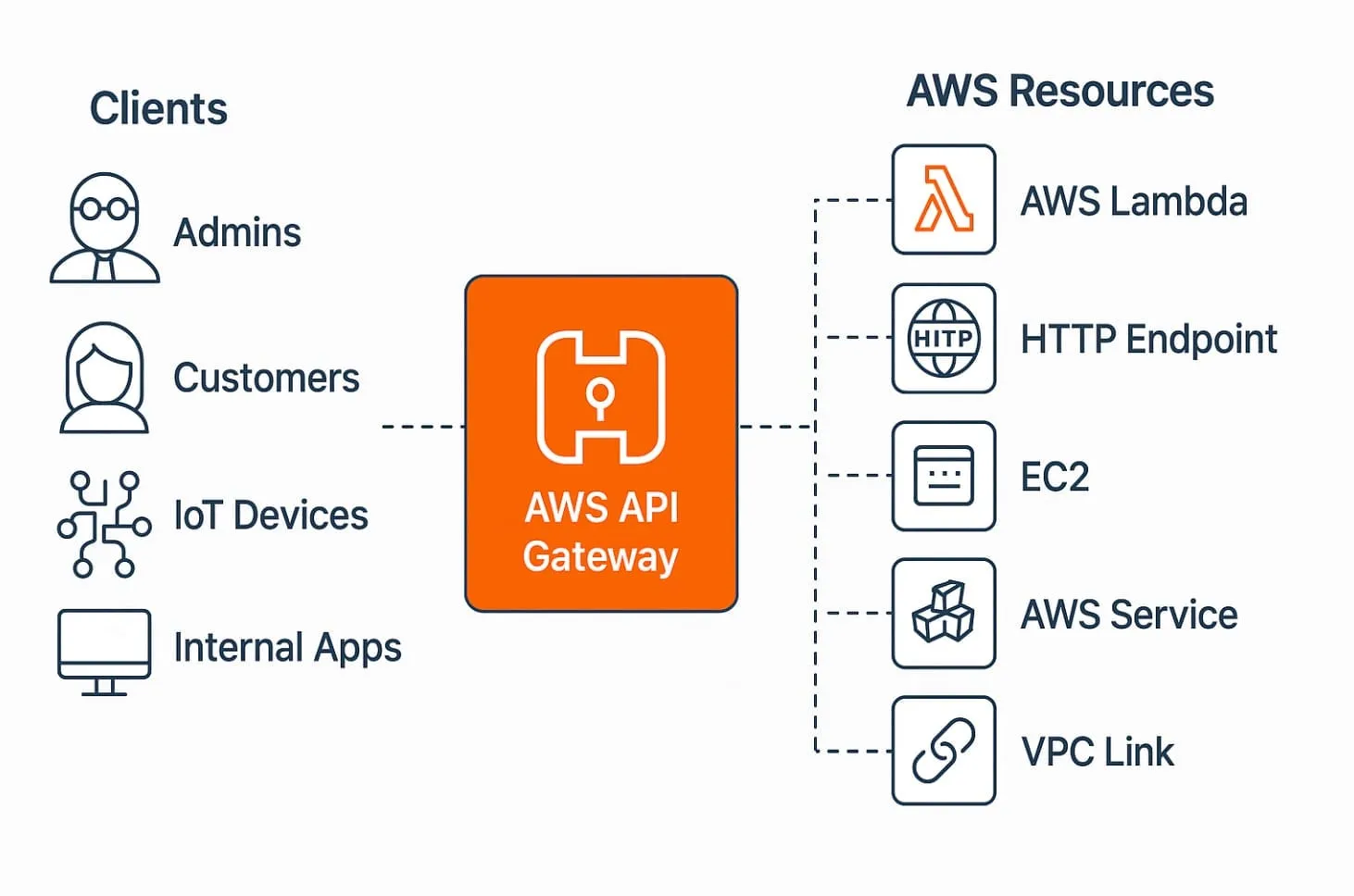
AWS API Gateway is a fully managed service that allows you to define, secure, monitor, and route HTTP(S) requests to backend services like:
-
AWS Lambda functions
-
Internal microservices over VPC links
-
External URLs or legacy systems
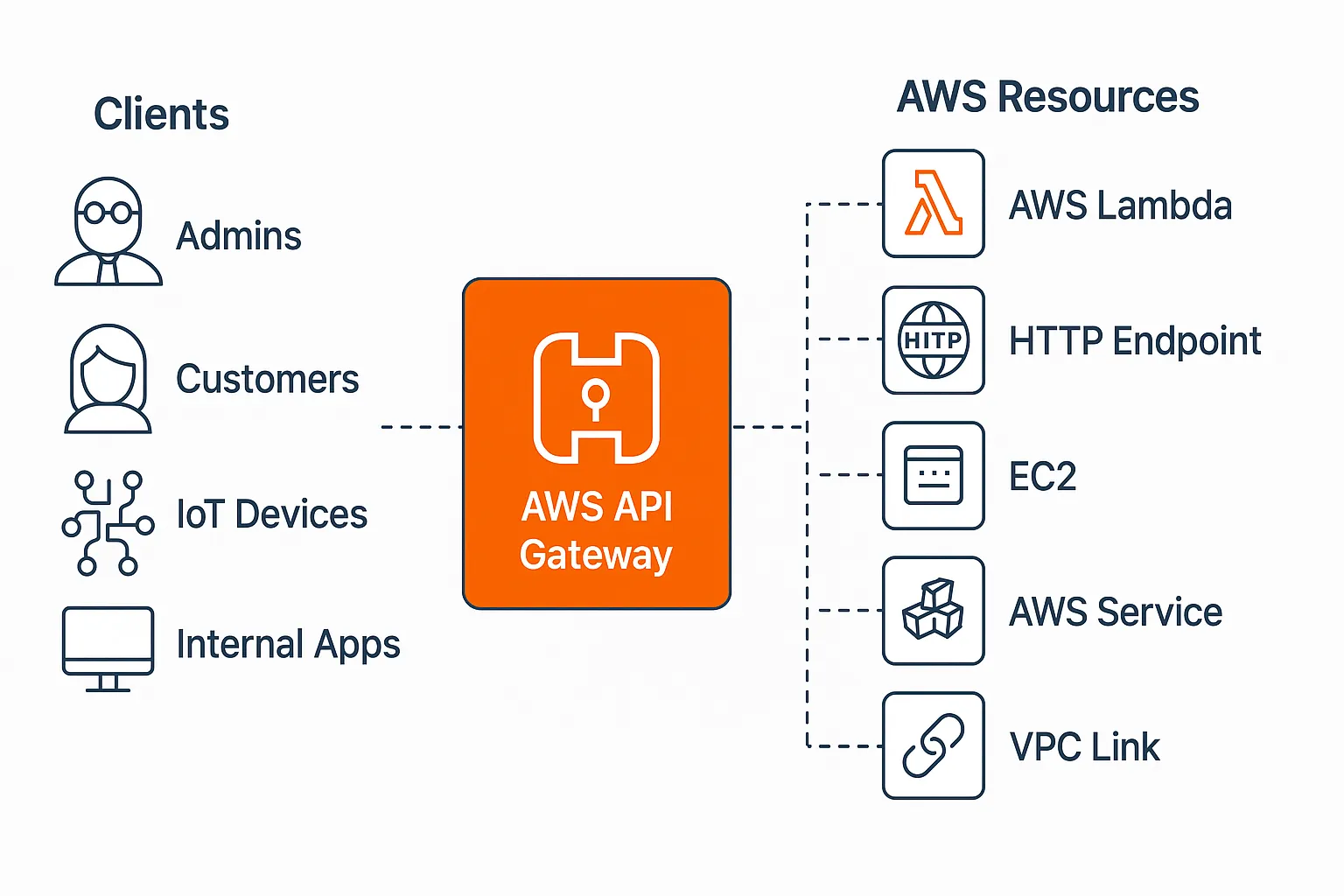
You can think of it as:
A programmable front door to your APIs, with built-in security, throttling, routing, logging, and environment separation.
Understanding Resources
In API Gateway, resources are like RESTful paths. Think of it as a skeleton for your API Gateway’s Route Paths:
-
/users -
/users/{userId} -
/orders/{orderId}
Each resource can have multiple HTTP methods (GET, POST, PUT, etc.) defined independently.
Resources allow you to:
-
Define proxy paths (
{proxy+}) for catch-all routing -
Attach different integrations (Lambda, VPC, mock) to different methods
-
Enable features like CORS per route
Stages: dev, staging, uat, prod
Stages are deployable versions of your API:
-
Each stage is tied to a deployment snapshot
-
URLs are prefixed with the stage name:
https://abc123.execute-api.us-east-1.amazonaws.com/dev
Stages let you:
-
Deploy to isolated environments (dev, prod)
-
Attach different logging levels
-
Configure stage variables for dynamic routing
Authorizers
Authorizers let you secure endpoints by validating tokens or identity headers before passing requests to your backend.
Types:
-
Lambda Authorizer: custom logic (e.g., JWT parsing, RBAC)
-
Cognito Authorizer: native integration with AWS Cognito user pools
You can attach authorizers to:
-
Specific HTTP methods
-
All routes under a resource (via inheritance)
This helps enforce identity-aware access control without modifying backend code.
API Keys
API Keys in API Gateway are identifiers for clients — used mainly for:
-
Throttling individual clients
-
Monitoring usage per key
-
Enforcing quota limits
They are not a security mechanism (like OAuth or JWT). They’re passed via the x-api-key header and must be tied to a Usage Plan to take effect.
Usage Plans
Usage Plans define:
-
Rate limits (requests per second)
-
Burst limits (temporary spikes)
-
Quota (total requests per day/week/month)
You associate:
-
One or more API Keys
-
One or more stages
-
Optional throttling and quota
This lets you manage free-tier access, premium clients, or internal vs public access from a single control plane.
Binding Lambda to Resource Routes (Proxy vs Non-Proxy)
Proxy Integration (AWS_PROXY)
-
Sends the entire HTTP request as-is to your Lambda function
-
Lambda receives event with:
- Headers, method, path, body, etc.
Ideal for backend-for-frontend use cases or single-function APIs
Non-Proxy Integration
-
You must manually map request fields (method, body, query, etc.)
-
Allows fine-grained control but adds complexity
Use this when your backend expects a specific format or when integrating with legacy systems.
Binding VPC Link to Resource Routes (Proxy vs Non-Proxy)
Use VPC Link to expose internal services running in private subnets (behind an NLB).
Proxy Integration (HTTP_PROXY)
-
Entire request is forwarded “as-is” to your internal service
-
Simplest option, minimal config
Non-Proxy Integration
-
Define request templates to transform data before forwarding
-
Useful when bridging REST to legacy backends that expect specific formats
Enabling CORS (Cross-Origin Resource Sharing)
CORS is required when:
- Your frontend (e.g., hosted on
example.com) accesses an API on a different domain (e.g.,api.example.com)
To enable CORS:
-
Add an OPTIONS method to each route
-
Return headers like:
-
Access-Control-Allow-Origin -
Access-Control-Allow-Methods -
Access-Control-Allow-Headers
-
You can enable this manually or use the console’s Enable CORS feature — but make sure your responses return these headers dynamically, especially in error cases.
Stage Variables
Stage Variables act like environment variables for API Gateway.
Use them to:
-
Switch between Lambda aliases (
dev,prod) -
Configure endpoint URLs (for VPC links)
-
Inject environment-specific logic into integrations
They’re accessible in:
-
Integration targets as
${stageVariables.<name>} -
Mapping Values as
stageVariables.<name>
Using Stage Variables for Proxy+ VPC Link Routing
One powerful trick:
Use a proxy route like
/internal/{proxy+}and bind it to different VPC endpoints using stage variables.
Example:
Integration URI: http://${stageVariables.vpcEndpoint}/{proxy}Each stage (dev, prod, etc.) defines a different vpcEndpoint variable.
This makes things —
-
Clean
-
Environment-aware
-
No code duplication
Conclusion
AWS API Gateway is incredibly flexible but only if you understand how its building blocks work together.
This post covers:
-
Routing with Lambda or VPC
-
Security with Authorizers and API keys
-
Flexibility with Stage Variables
-
Browser Integration via CORS
Want to see this in action with real configs or Terraform/CDK examples? Drop your questions in the comments — let’s build it out together.