Hardware Tests in the Browser: What the Platform Refuses to Measure
I bought a Keychron K2, decided Command and Option were in the wrong places, and went looking for the setting that had swapped them.
Nothing was swapped. The board was sending exactly what macOS expected. I still had the Windows keycaps installed, so the key labelled Alt was Command. I had been reading the plastic instead of the keyboard.
The annoying part is that the two most likely causes look identical from outside. A key doing the wrong thing is either a firmware issue or the OS quietly remapping it, and you cannot tell by pressing harder. So I built a keyboard test that shows the key code your computer actually receives, and then, because the editor was already open, a mouse test, a screen test and a sound test.
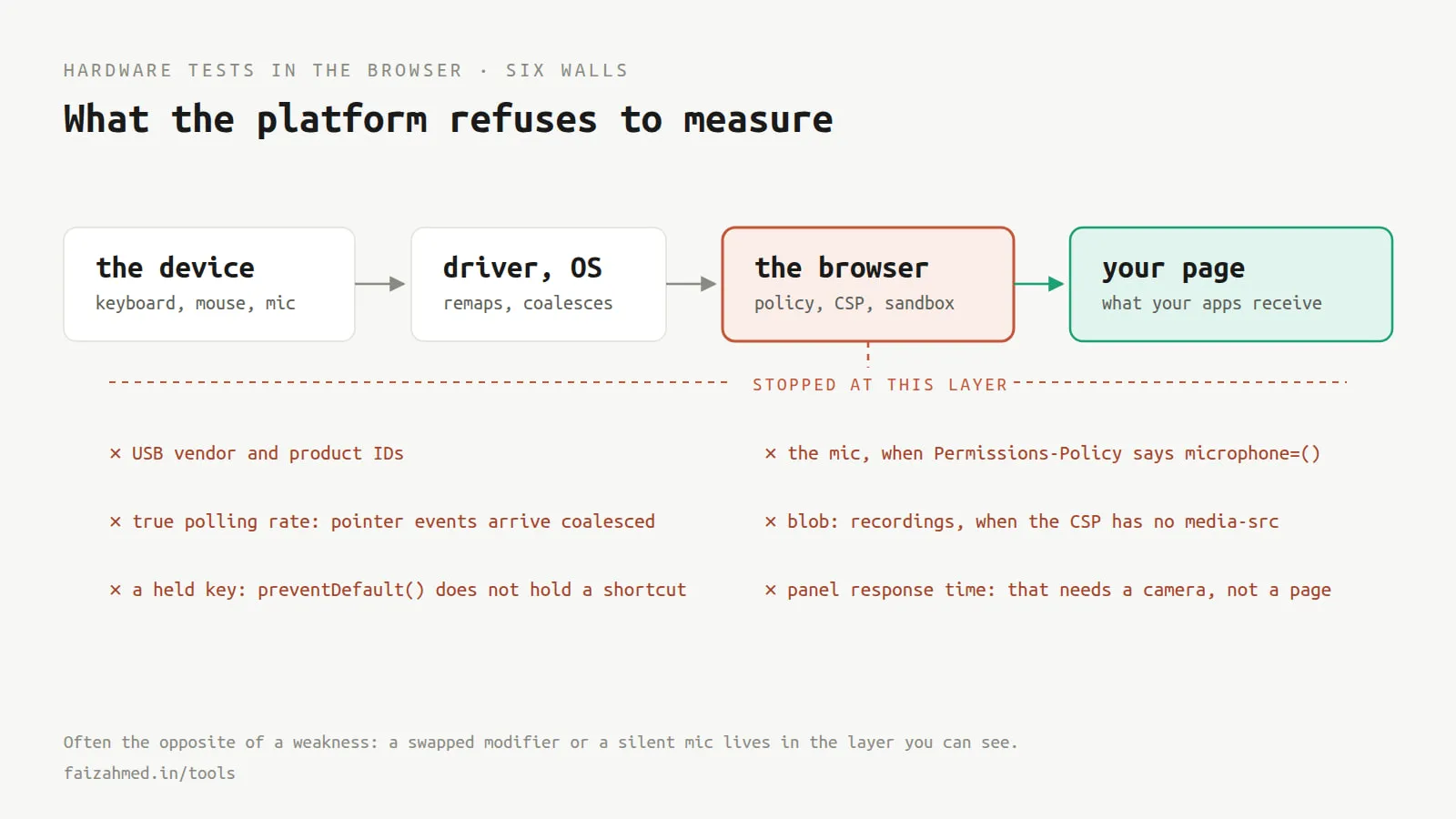
What follows is not the tools. It is the six places the browser said no, because every one of them took longer than the feature it was blocking.
preventDefault does not hold a keyboard shortcut
The keyboard test has an opt-in mode that captures shortcuts, so you can press Tab and Cmd+F and watch them register instead of doing their normal jobs. The obvious implementation is one line:
document.addEventListener("keydown", (ev) => {
  ev.preventDefault();
});
That is wrong, and it is wrong in a way that looks correct until something else on the page proves otherwise. preventDefault() cancels the browser’s default action for the event. It does nothing to other listeners. My own site has a Cmd+K search palette bound on document, and it opened cheerfully on top of the test I was building.
Holding a key means stopping the event from reaching anything else, which needs the capture phase and a different method:
document.addEventListener("keydown", (ev) => {
  ev.preventDefault();
  ev.stopImmediatePropagation();
}, true);
The true matters as much as the call. Capture-phase listeners on document run before bubble-phase ones on the same node, so this fires first and the palette never hears about it.
Keyboard Lock exists, and it is fussy
Even with propagation stopped, some keys never reach the page at all. Escape, Cmd+W and Cmd+T are the browser’s, not yours.
There is a real API for this, navigator.keyboard.lock(), and it works. It also requires fullscreen, and it is Chromium only. So the honest shape of the feature is three layers, not one: preventDefault plus stopImmediatePropagation for everything cancelable, Keyboard Lock for the browser-reserved keys where the API exists, and nothing at all for the third layer.
That third layer is the operating system. Cmd+Tab, Cmd+Space, Alt+Tab, the Win key, Ctrl+Alt+Del. No web page captures those, on any browser, ever. If a page tells you it can, it is lying to you, and I would go and look at what else it claims.
The design consequence is that the UI has to say which layer is currently active rather than implying it caught everything. Mine prints “full capture” only when fullscreen and the lock both succeeded, and names the specific keys it does not hold otherwise.
One more thing worth building: a keyboard-only visitor who enables capture has just disabled their own escape route. Three presses of Escape inside 1.5 seconds releases it, which costs nothing and prevents trapping someone in a mode they chose.
Pointer events will happily lie about your polling rate
Every browser mouse tester I looked at reports a polling rate by counting pointermove events per second. On my machine that number lands suspiciously close to 60.
It is not the mouse. Browsers coalesce pointer movement, batching everything that arrived since the last frame into a single event. Counting those events measures your display refresh rate wearing a mouse costume. A 1000Hz mouse reads 60.
The uncoalesced stream is available, in two forms:
// Everything that arrived since the last frame
const parts = ev.getCoalescedEvents?.();

// Or the least filtered stream the browser offers
if ("onpointerrawupdate" in window) {
  pad.addEventListener("pointerrawupdate", onRaw);
}
pointerrawupdate is the better source where it exists. getCoalescedEvents() is the fallback. Raw pointermove is the last resort and needs to be labelled as such, because a number that reads 60 for entirely structural reasons is worse than no number.
Even done properly this is not a hardware measurement. It is the rate the browser hands over, which the OS input stack and browser throttling both push down. It is a floor. My page says so, in the panel, next to the figure.
Permissions-Policy had already disabled the microphone
The sound test needs getUserMedia. It failed immediately, before any permission prompt, and the error was not obviously about permissions.
The cause was my own security header, added years ago and never revisited:
Permissions-Policy: camera=(), microphone=(), geolocation=()An empty allowlist means no origin may use the feature. Not “ask the user”. Not “only same-origin”. No origin, including mine. The mic test could not even get as far as a prompt.
The fix is one token:
Permissions-Policy: camera=(), microphone=(self), geolocation=()(self) permits my own origin and still refuses every embedded frame. Camera and geolocation stay closed because nothing on the site needs them.
The lesson is not “loosen your headers”. It is that a deny-all Permissions-Policy is invisible until the day you need the feature, and then it fails in a way that looks like a browser bug. Worth knowing what yours says before you spend an hour on the wrong thing.
The CSP blocked my own recording
The mic test records a few seconds and plays it back. The standard route is MediaRecorder, which hands you a Blob, which you turn into a blob: URL and give to an audio element.
My CSP has no media-src, so it falls back to default-src 'self', and a blob: URL is not 'self'. Blocked.
AudioWorklet is the modern way to touch raw audio, and it has the same problem from the other direction: it loads a module from a URL, and the usual trick for an inline worklet is a blob: URL, which is blocked for the identical reason.
So the recording path is a ScriptProcessorNode, which has been deprecated for years:
const processor = ac.createScriptProcessor(4096, 1, 1);
processor.onaudioprocess = (ev) => {
  if (recording) chunks.push(new Float32Array(ev.inputBuffer.getChannelData(0)));
};
Samples go into an AudioBuffer and play back through an AudioBufferSourceNode. No blob, no extra URL, no CSP change. A deprecated API was the right call, and the comment above it in the source explains why so that nobody helpfully modernises it later.
Two other details in that file, both about not hurting anyone. The mic is connected to an analyser and a silent sink, never to the destination, because routing a microphone to the speakers is a feedback loop. And every tone starts at 12% gain, ramps rather than jumps, and caps at 50%, because a test tone at full volume through headphones can do real damage and a page that can produce one by accident should not exist.
Refresh rate is measurable, response time is not
The screen test reports a refresh rate. Browsers do not expose one, so it is timed: collect requestAnimationFrame intervals over a rolling window and take the median.
That works well enough to be useful. It also drifts down whenever anything else is happening, so it is a floor rather than a spec, and the page shows per-frame pacing next to the number so a stuttering run is visibly a stuttering run rather than a lower panel.
One detail worth pre-empting in the copy: on a 60Hz panel this reads 59.9. That is measurement noise on a 16.7ms frame, not a fault, and without a sentence saying so it generates the confident bug report.
Response time is the one I could not do at all. Grey-to-grey is a camera measurement. Software running on the same machine cannot see when a pixel finished changing, so the ghosting test shows moving blocks at three contrasts and lets your eyes judge, which is honest, and gives you no number, which is also honest.
The pattern
The browser will not tell you what your hardware is. No USB identifiers, no DPI, no panel model, no vendor. WebHID and WebUSB exist, and most keyboards and mice sit on their blocklist specifically to stop pages from building keyloggers, which is the correct trade.
What it will tell you, precisely, is what your applications receive. Which key code arrived. Which mouse button fired and when. Whether a frame was late. Whether audio is reaching the output and whether the microphone is capturing.
For diagnosing something that feels broken, that second thing is usually the answer you actually wanted. My keyboard was never misconfigured. The layer that was wrong was the one between my eyes and the keycap, and the only tool that could have told me was one that reports what the computer received rather than what the label claimed.
They are all at faizahmed.in/tools, along with the gamepad, webcam and touchscreen ones that followed. No signup, nothing uploaded, and each says out loud what it cannot measure.