Claude Code Hooks: How They Work, With a Real PR Audit
The review comments were always the same three or four things.
A function that had quietly grown to two hundred lines. A catch block that swallowed the error and returned null. Config read straight out of process.env in the middle of a request handler. None of it hard to spot, none of it interesting to write up for the fourth time that month, and all of it found a full day after the developer had moved on to something else.
That delay is the actual cost. Not the review, the round trip. So we moved the audit to the moment the push is attempted, using a Claude Code hook. This post explains what hooks are, how the one we run works, and what it cannot do.
What are Claude Code hooks?
A Claude Code hook is a command that Claude Code runs automatically at a fixed point in its own lifecycle: before a tool call, after a file edit, when a session starts, when Claude tries to finish a turn. You configure hooks in a settings.json file, and each hook can observe what is about to happen, add context, or block it outright.
The value is entirely in the word fixed. You are not asking the model to remember to run the linter. You are arranging for the linter to run whether or not anybody remembered. That makes hooks the mechanism for rules you want enforced deterministically, as opposed to instructions in a CLAUDE.md, which the model reads and usually follows.
Hooks as team guardrails, not personal settings
The part that changed how we think about them: hooks live in three places, and one of them ships with the repo.
~/.claude/settings.json applies to one person, everywhere. .claude/settings.local.json applies to one person, one project, and is gitignored. .claude/settings.json is committed, so everyone who clones the repo gets the same hooks. Organisations can also push managed hooks that individual settings cannot override. Hooks from all of these merge rather than replace each other.
Once a hook is in the committed file, it stops being a productivity tweak and becomes a piece of team policy: the same check, at the same point, for every developer working through Claude Code, without anyone having to install anything. That is the frame we ended up using. Not “I automated my workflow” but “the repo now carries its own review standard.”
There is one more property that makes this hold up. PreToolUse hooks fire before any permission check, in every permission mode. A hook that denies a tool call blocks it even under bypassPermissions, even with --dangerously-skip-permissions. Somebody who turns off every prompt because they are in a hurry still cannot push past the audit. The reverse does not hold: a hook returning allow never overrides a deny rule in settings. Hooks can tighten what is permitted, never loosen it. That asymmetry is deliberate and it is the right way round.
How we audit PRs before the push
This is the hook, in .claude/settings.json, committed:
{
  "hooks": {
    "PreToolUse": [
      {
        "matcher": "Bash",
        "hooks": [
          {
            "type": "command",
            "if": "Bash(git *)",
            "command": "${CLAUDE_PROJECT_DIR}/.claude/hooks/smell-audit.sh",
            "timeout": 120,
            "statusMessage": "Running code smell audit..."
          }
        ]
      }
    ]
  }
}
The matcher picks the tool, case-sensitively: Bash here, but Edit|Write or a regex like mcp__.* work too. The if field narrows further using permission-rule syntax, and the matching is smarter than a string compare: leading VAR=value assignments are stripped, each subcommand of a chain is checked, and commands inside $() and backticks are checked too. So npm test && git push still matches Bash(git *). We filter on git rather than git push because a pattern has to leave room for arguments, and the script exits 0 immediately for anything that is not a push.
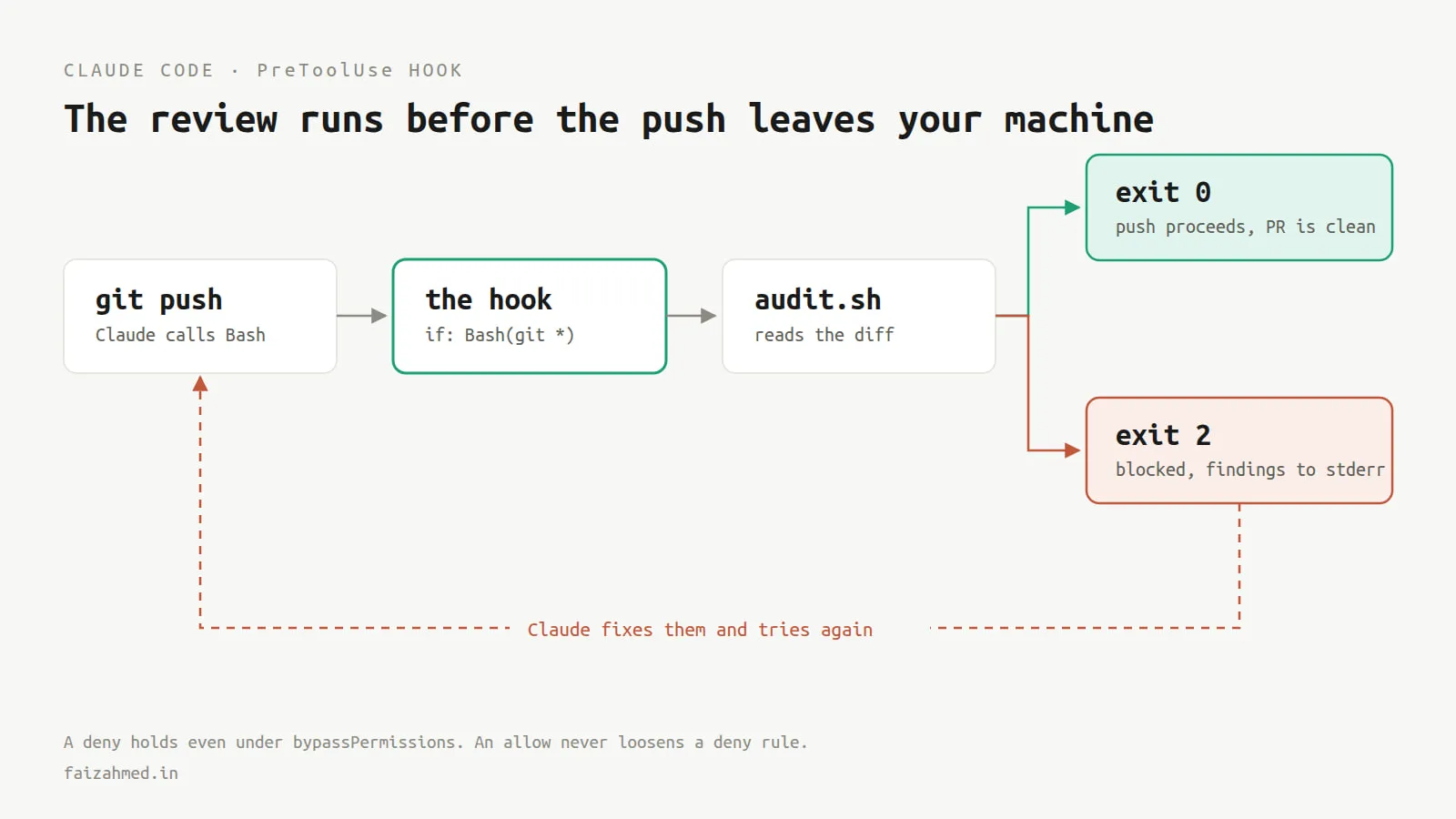
When Claude tries to run git push, the hook fires first. The script reads the diff, runs our checks, and decides. If it finds something, it exits 2 and writes the findings to stderr. The push never happens, and Claude gets the findings back as the tool error, so it fixes them and tries again. If the script is happy, it exits 0 and the push goes through untouched.
Worth being precise about that last part, because it is the bit people get backwards: the hook does not push anything. It declines to stop a push that was already being attempted. The distinction matters once you start reasoning about what a hook can and cannot do.
Which hook events exist?
Claude Code fires events across its whole lifecycle, and the list has grown a lot. The ones worth knowing by name:
Around a tool call. PreToolUse fires before a tool runs and can block it. PostToolUse fires after it succeeds, PostToolUseFailure after it fails, and PostToolBatch after a whole batch of parallel calls resolves. PermissionRequest fires when Claude Code is about to ask you to approve something.
Around a turn. UserPromptSubmit fires before your prompt reaches the model and can reject it. Stop fires when Claude finishes responding and can refuse to let it stop, which is how you build a “you are not done until the tests pass” rule.
Around a session. SessionStart, SessionEnd, PreCompact and PostCompact, plus FileChanged, CwdChanged and ConfigChange for reacting to the environment moving underneath you.
Most hooks are "type": "command" and run a shell command. There are also prompt hooks, which send the event to a Claude model for a single yes-or-no judgment, and agent hooks, which spawn a subagent that can read files before deciding. Those two exist precisely for checks that need judgment rather than a rule. Ours is deliberately a plain script, because we wanted the audit to be deterministic and fast to reason about.
What do exit codes 0 and 2 actually do?
Claude Code passes the event data to your script as JSON on stdin and reads your answer from the exit code. Three cases:
0is success. Stdout goes to the debug log, unless it parses as JSON, in which case the fields are honoured.2is a blocking error. OnPreToolUsethe tool call is denied, and stderr is handed to Claude as the reason. This is the one that does work.- Anything else is a non-blocking error. Claude Code notes it and carries on.
So the minimum viable guardrail is a script that prints to stderr and exits 2. Everything beyond that is refinement.
If you want more control than an exit code, return JSON on stdout instead:
{
  "hookSpecificOutput": {
    "hookEventName": "PreToolUse",
    "permissionDecision": "deny",
    "permissionDecisionReason": "3 issues found. See audit output.",
    "additionalContext": "src/api/orders.ts:142 handler is 210 lines"
  }
}
additionalContext is the useful one: it injects text Claude reads before deciding what to do next, which turns a blocked push into a specific instruction rather than a wall.
What hooks cannot do: two honest limits
I would rather write these down than pretend the setup is free.
It is slower than you think. A push used to be instant and now it stops to think. Command hooks get a ten minute default timeout, which is far too generous for something sitting in the path of a routine action, so set timeout explicitly. Ours is 120 seconds and still occasionally feels long. If a check does not need to block anything, mark the hook "async": true and let it run in the background rather than making everybody wait on a report nobody is going to read.
The deeper version of this problem is that hooks on the same event run in parallel and every one of them runs to completion before the results are merged. One hook returning deny does not cancel its siblings. If you have three checks and one is slow, you pay for the slow one every time.
A local hook is not a gate. This is the important one. The hook only sees tool calls made by Claude Code. A developer who opens a terminal and types git push themselves has not bypassed anything clever; they have simply never been anywhere near the hook. The same goes for pushing from an IDE, from a git GUI, or from CI.
So be honest about what you have built. We did not add an enforcement mechanism. We added a very fast reviewer that catches the boring stuff for people who are already working through Claude Code, which in our repo is most of them most of the time. The branch protection rule in GitHub is still the gate, and it always will be, because a gate has to live somewhere a developer cannot choose to walk around.
Treating the hook as a gate is how you end up with a policy that is only enforced for the people who least needed enforcing.
How to add your first hook
Run /hooks to see what is currently registered, and add hooks there or by editing .claude/settings.json directly. When one silently does nothing, it is almost always one of three things: the matcher does not match, the script is not executable, or the path is wrong. Test it the boring way before blaming the tooling:
echo '{"tool_name":"Bash","tool_input":{"command":"git push"}}' | ./.claude/hooks/smell-audit.sh
echo $?
Turn on "debug": { "hooks": true } in settings and the execution log lands in ~/.claude/logs/.
Start with one check you are tired of writing in review comments. Exit 2, print why to stderr, and see whether the round trips drop. That is the entire experiment, and it takes about an hour.
Frequently asked questions
Can Claude Code hooks block a command? Yes. A PreToolUse hook that exits 2, or returns "permissionDecision": "deny", stops the tool call before it runs. The deny holds in every permission mode, including bypassPermissions.
Do hooks run for every developer on the team? Only if they live in the committed .claude/settings.json, or are pushed as managed organisation settings. Hooks in ~/.claude/settings.json or .claude/settings.local.json apply to one machine.
Can a developer bypass a Claude Code hook? Yes, trivially, by not using Claude Code for that action. A hook only observes tool calls Claude Code makes. Anything typed into a terminal, an IDE or a git client never reaches it. Use branch protection or CI for anything that must be enforced.
What is the difference between a hook and a CLAUDE.md instruction? A CLAUDE.md instruction is text the model reads and usually follows. A hook is code that runs regardless of what the model decides. Use instructions for guidance and hooks for rules.
How long can a hook run? Command hooks default to ten minutes, prompt hooks to 30 seconds, agent hooks to 60. Set timeout per hook, and use "async": true for anything that should not hold up the action.