
Packaging Node.js Libraries the Right Way: ESM, CommonJS, and Bundlers in 2025
Why Packaging Still Breaks in 2025?
Despite being two decades into Node.js, publishing a library that works across CommonJS (CJS), ECMAScript Modules (ESM), TypeScript, and bundlers is still confusing.
Why? Because:
-
Node.js evolved from CJS to ESM gradually
-
Bundlers (Vite, Webpack, Rollup) behave differently
-
Developers mix TS,
.mjs,.cjs, and.jsin weird ways -
Package consumers have wildly different expectations
So let’s break it down - cleanly and practically - to ship libraries that don’t break.
CommonJS vs ESM: Know the Difference
| Feature | CommonJS | ECMAScript Modules (ESM) |
|---|---|---|
| Import syntax | require() | import / export |
| Export syntax | module.exports / exports | export default / export |
| File extension | .js (default) | .mjs or "type": "module" |
| Synchronous | Yes | No (top-level await allowed) |
| Used in | Legacy Node.js, most tooling | Modern projects, Deno, browser-native |
Interop Problems:
-
ESM can’t
require()CJS modules directly if they usemodule.exports -
CJS can’t use
importunless you compile it -
Some bundlers resolve
"main"and"module"fields inconsistently
package.json Fields That Matter
Your package.json tells the outside world how to load your code. Here’s what matters:
{
  "name": "my-lib",
  "main": "dist/index.cjs",      // CommonJS entry
  "module": "dist/index.esm.js", // ESM entry for bundlers
  "exports": {
    ".": {
      "require": "./dist/index.cjs",
      "import": "./dist/index.esm.js"
    }
  },
  "types": "dist/index.d.ts"
}
Field Breakdown:
-
"main": default for Node (CommonJS) -
"module": used by bundlers like Rollup, Vite (ESM) -
"exports": modern standard to declare per-import conditions -
"types": entry point for TypeScript declarations
Dual Publishing: Support CJS + ESM
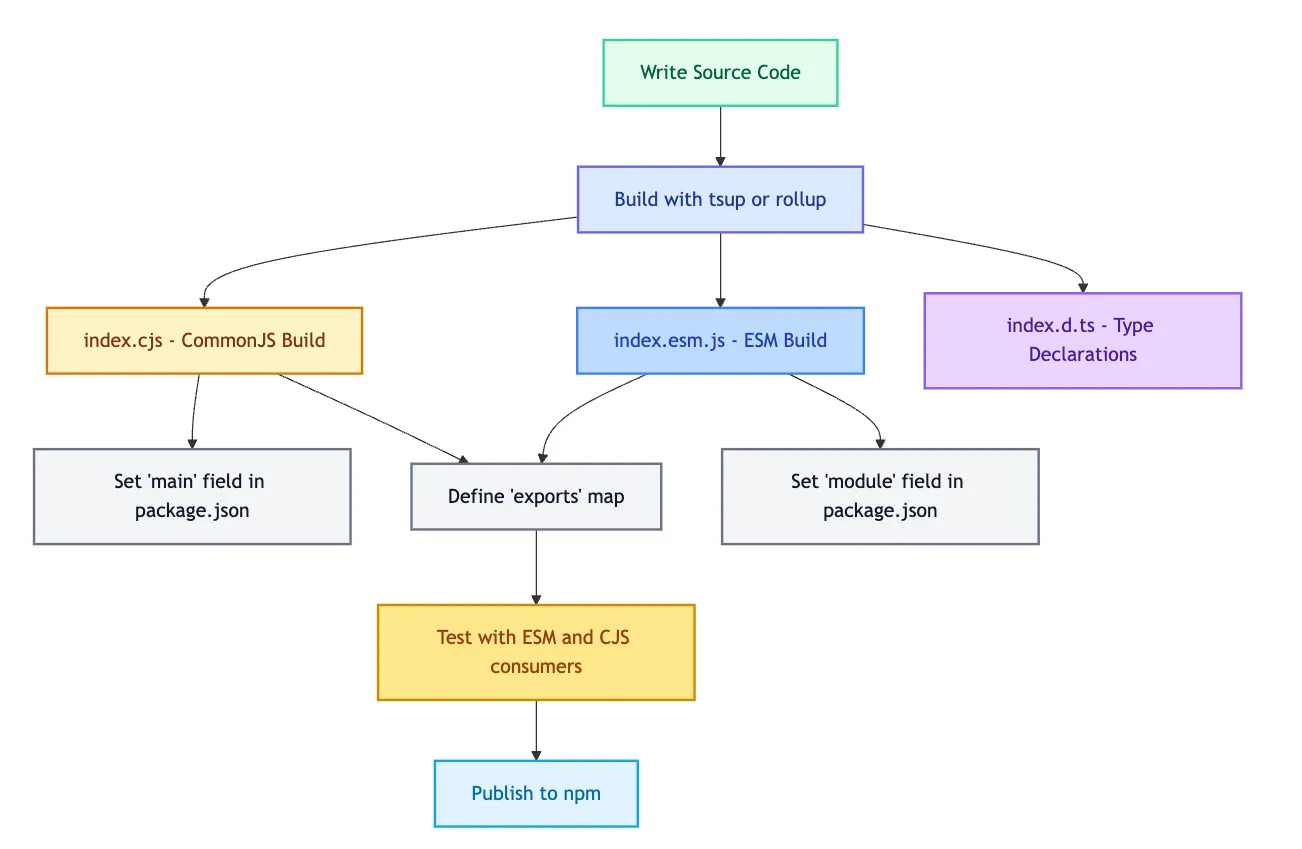
If you want your library to work in both ecosystems, publish both builds.
📂 Example:
/dist
  ├── index.cjs      ← CommonJS
  ├── index.esm.js   ← ES Module
  ├── index.d.ts     ← TypeScript types
Use a bundler like tsup, rollup, or unbuild to output both formats cleanly:
tsup src/index.ts --format cjs,esm --dtsShould You Pre-Bundle?
✅ Pre-bundling is helpful when:
-
You ship multiple files
-
You use dependencies that might break interop
-
You want fast cold-starts or browser builds
❌ Don’t pre-bundle if:
-
Your library is dead simple (1 file)
-
You want tree-shaking to be fully consumer-controlled
👉 If unsure, use tsup — it’s fast, ESM-aware, and minimal config.
Testing Your Package as a Consumer
Test it as your users would:
-
Import into ESM-only projects
-
Require from legacy CommonJS
-
Build with
vite,webpack,rollup, and evennode --experimental-loader
Use real-world tools like:
npm init vite@latest
npm i your-lib
# Try importing and running
Common Pitfalls
-
❌ Top-level
awaitin ESM without proper Node flag -
❌ Missing
"exports"field breaks bundlers -
❌ Default exports in CJS confuse ESM importers
-
❌ Mixing
.js,.ts,.mjs,.cjswithout clear build strategy
Bonus: When to Use .cjs and .mjs
If your package.json does not specify "type": "module":
-
Use
.cjsfor CommonJS -
Use
.mjsfor ESM
If it does specify:
"type": "module"Then:
-
Use
.jsfor ESM -
Use
.cjsfor legacy interop (only when needed)
Packaging Workflow
Summary: Ship Libraries That Just Work
| What to do | Why it matters |
|---|---|
| Build both CJS + ESM | Maximum compatibility |
Use exports in package.json | Precise interop, future-proofing |
Include .d.ts types | TypeScript + IntelliSense friendly |
| Test across environments | No surprises for consumers |
Want Examples or a Minimal Boilerplate?
I’ve skipped code/config samples here intentionally.
Got questions or stuck on a setup? Drop them in the comments — happy to help with real-world fixes.