Understanding MSE and EME: How Modern Video Streaming Works in Your Browser
Streaming Has Changed!
Once upon a time, watching movies online meant installing Flash or Silverlight plugins.
Today?
You open your browser, hit play, and stream a 4K, encrypted movie instantly - no plugins, no lag.
The magic behind this modern experience —
Media Source Extensions (MSE) and Encrypted Media Extensions (EME).
What is MSE (Media Source Extensions)?
In simple terms —
MSE lets your JavaScript app feed video/audio chunks directly to the browser’s media player.
Why it matters —
-
Allows streaming instead of downloading the full video first
-
Enables adaptive bitrate, and switch video quality based on internet speed
-
Supports live streaming, VOD, and custom buffering
How it works —
-
Create a
MediaSourceobject -
Add a
SourceBuffer(e.g., for H.264, AAC) -
Fetch video/audio chunks via XHR or Fetch
-
Append chunks into the buffer → Browser plays them
✅ Use Cases —
-
YouTube
-
Twitch
-
Custom video players (e.g. DASH.js, Shaka Player)
What is EME (Encrypted Media Extensions)?
In simple terms —
EME allows your browser to decrypt and play protected (DRM) content using built-in secure modules.
Why it matters —
-
Protects premium content (movies, shows, sports)
-
Works with industry-standard DRM systems like:
-
Widevine (Google)
-
PlayReady (Microsoft)
-
FairPlay (Apple)
-
How it works —
-
Browser detects encrypted media
-
Fires a
encryptedevent -
JS app contacts a license server to fetch decryption keys
-
Keys are passed to the browser’s Content Decryption Module (CDM)
-
CDM decrypts and plays the content securely
✅ Use Cases —
-
Netflix
-
Disney+
-
Hulu
-
Amazon Prime Video
How MSE and EME Work Together
They form a powerful duo for secure, smooth media playback:
| Component | Role |
|---|---|
| MSE | Streams video/audio chunks dynamically |
| EME | Handles DRM-protected media decryption |
Example: Netflix uses MSE to buffer adaptive video streams and EME (with Widevine) to decrypt them securely.
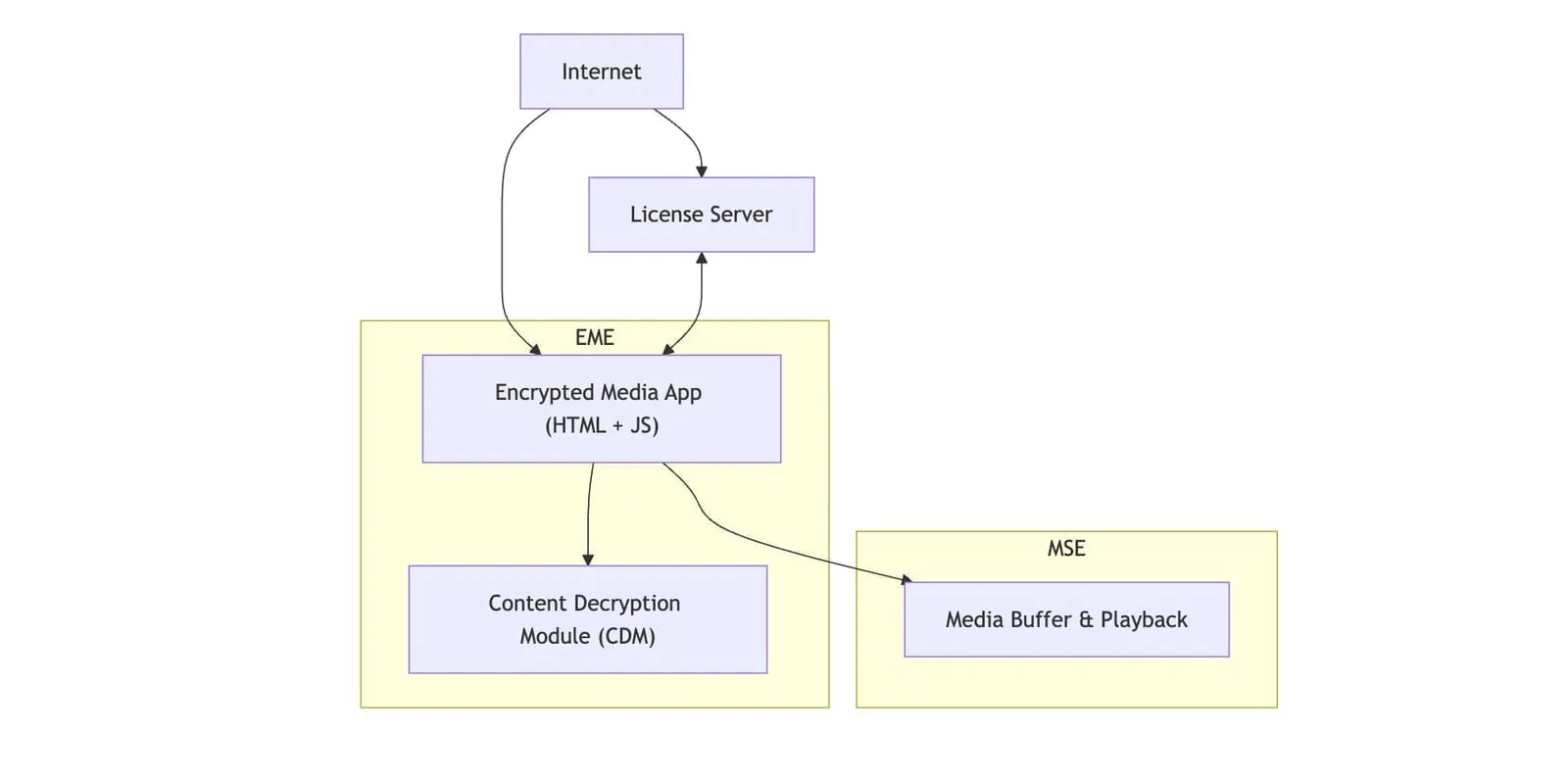
Visual Architecture
Internet ↴
     +---------+            +-----------------------+
     | License | <------->  | Encrypted Media App   |
     | Server  |            | (HTML + JS)           |
     +---------+            +-----------------------+
                                 |             |
                               [EME]         [MSE]
                                 ↓             ↓
                    +-------------------+ +------------------+
                    | Content Decryption| | Media Buffer     |
                    | Module (CDM)      | | & Playback       |
                    +-------------------+ +------------------+
Benefits of MSE + EME
| Feature | MSE | EME |
|---|---|---|
| Streaming | ✅ | ❌ |
| Adaptive Bitrate | ✅ | ❌ |
| Secure Decryption | ❌ | ✅ |
| Plugin-Free Playback | ✅ | ✅ |
| DRM Support | ❌ | ✅ |
Common Gotchas
-
Not all browsers support the same DRM systems:
-
Chrome → Widevine
-
Safari → FairPlay
-
Edge → PlayReady
-
-
You need media encrypted using CENC (Common Encryption)
-
Integrating EME requires working with a license server (e.g., BuyDRM, Axinom)
Real-World Examples
| Platform | Uses |
|---|---|
| Netflix | MSE (adaptive streaming) + EME (Widevine/FairPlay/PlayReady) |
| YouTube | MSE for buffering; EME for Premium content |
| Twitch | MSE + custom low-latency streamers |
Conclusion
MSE and EME are what make plugin-free, high-quality, secure streaming possible on the modern web.
-
MSE: Streams media smartly
-
EME: Keeps it secure
If you’re building a custom video player, or want to understand how platforms like Netflix work under the hood - mastering these APIs is a must.
📣 Call to Action:
Curious how this integrates with streaming formats like DASH or HLS? Or want a full guide on building a DRM-compliant video player in the browser? Let me know!